A new kind of visitor
Your website was built for humans. It assumes eyes that scan, fingers that click, scroll bars that reveal what's below the fold. Most of what makes a site feel polished (the hero video, the generous whitespace, the scroll-triggered animations) is invisible to the next class of visitor already knocking at the door.
AI agents don't scroll. They fetch. They don't click through menus. They read HTTP headers and follow manifests. They don't scan images. They want plain text they can reason about.
Cloudflare recently launched a scanner at isitagentready.com to test exactly this: how readable is your site to a visitor that isn't a human? On our first scan, settlewithai.com scored 25 out of 100. Level 1 — Basic Web Presence.
A few hours of work later, we scored 83. Level 5 — Agent-Native. The scanner's top tier.
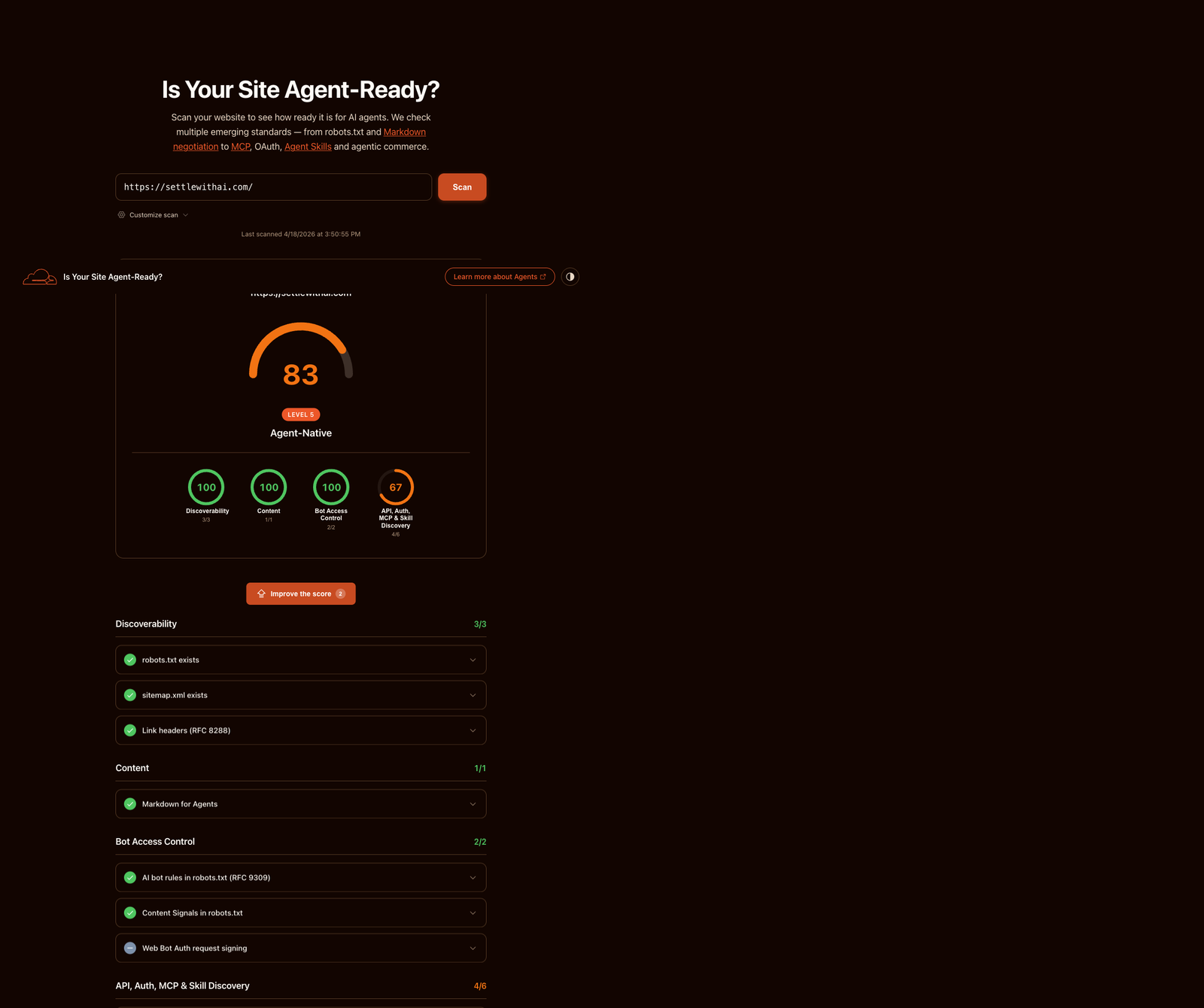
Scan result via isitagentready.com, Cloudflare's public agent-readiness scanner.
This post isn't a victory lap. It's a walk-through of the four categories the scanner checks, the kind of signals each one wants, and what we decided not to fake. If you run a public site, you'll want to do this exercise soon. Agents are already crawling.
What the scanner actually checks
The scanner tests four categories, each with a handful of concrete checks:
- Discoverability. Can an agent find your structured content without guessing URLs?
- Content accessibility.Can an agent read your page in a format that isn't styled HTML?
- Bot access control.Have you declared intent about what crawlers can and can't do with your content?
- API, auth, MCP, and skills. Have you advertised the tools an agent can actually call?
Most public sites fail most of these. Not because they're misconfigured, but because the signals mostly didn't exist three years ago. The category is that new.
Pillar one: discoverability
The web evolved around one discovery mechanism: Google. You optimised for search, you wrote meta tags, you submitted a sitemap. That was mostly enough.
Agents don't use Google. They fetch your homepage and inspect the HTTP response headers. Specifically, they look at the Linkheader, a standards-based mechanism for pointing to related resources. It's been around since RFC 8288, but most sites only use it for CDN preload hints.
There are four link relations worth advertising on your root URL:
describedby— points to a plain-text summary of your site (typically an llms.txt file)service-desc— points to a machine-readable API description (OpenAPI, for example)service-doc— points to human-readable API docsapi-catalog— points to a linkset of all your APIs, using RFC 9727
A well-configured homepage returns a Link header that mentions all of these. An agent can hit / with a HEAD request and immediately know what else you have. No crawl, no URL guessing.
The pointer: if you have docs, an API, or structured context, advertise it at the HTTP layer. Don't rely on the agent finding the right URL.
Pillar two: content accessibility
Here's a quick test you can run on your own site:
curl -H 'Accept: text/markdown' https://your-site.com/If you get back HTML, your site isn't agent-accessible. You gave the agent a representation it explicitly asked not to receive.
There's a community proposal called llms.txt that solves part of this: publish a single markdown file at /llms.txtsummarising your site, with links to the canonical pages. It's a sitemap for LLMs, written as prose.
The stronger pattern is content negotiation. When an agent sends an Accept: text/markdown header, return the markdown version of the page it actually asked for. Humans still get the full styled HTML. Agents get the representation they can reason about.
One detail that bites everyone: set Vary: Accepton the response so shared caches don't serve the wrong version to the wrong visitor. Sites add content negotiation, forget the Vary header, and CDN caches start handing markdown to browsers and HTML to agents. Debugging that is miserable.
The pointer: at minimum, publish an llms.txt. Ideally, negotiate content types on every significant page, and remember the Vary header.
Pillar three: bot access control
Most robots.txt files were written for search engines. They say things like “Googlebot can crawl everything except /admin.” That vocabulary isn't expressive enough for what's happening now.
Cloudflare proposed the Content Signals policy, which extends robots.txt with three directives that declare intent for how crawled content may be used:
search=yes|no— whether your content may appear in traditional search indexesai-input=yes|no— whether your content may be used as input for real-time AI answersai-train=yes|no— whether your content may be used to train future AI models
These signals don't enforce anything on their own. They're declarations. But well-behaved crawlers respect them, and the ecosystem is converging on this vocabulary faster than any prior bot-management convention.
The pointer: declare intent. Ambiguity is worse than any specific answer, because it forces every crawler to guess.
Pillar four: API, auth, MCP, and skills
This is the frontier. Most sites have nothing here, and hitting even one manifest puts you ahead of 99% of the public web.
A quick map of what to consider:
If you have APIs, publish a /.well-known/api-catalogfile using the RFC 9727 linkset format. It's a single JSON document listing every API you offer, with links to their OpenAPI descriptions. Agents discover your full surface area in one request.
If you have an MCP server (Model Context Protocol, the emerging standard for connecting agents to external systems), publish a server card at /.well-known/mcp/server-card.jsonpointing to the server's URL, protocol version, and transport type. Both Anthropic and OpenAI already support MCP discovery via this convention.
If you've published agent skills (reusable capabilities for Claude or similar models), the Agent Skills 0.2.0 discovery schema lets you publish an index at /.well-known/agent-skills/index.json with signed digests of each skill. Hosts that trust the index can load the skills directly, with integrity guarantees.
If your site is interactive, WebMCP lets you register in-browser tools that agents running in the user's browser can call. Useful for things like “summarise the current state of this page” or “fetch my logged-in context.” Client-side, no backend.
The pointer: advertise the tools an agent can actually call. If you don't have any yet, that's the next thing to build — not the next manifest to write.
What we deliberately didn't ship
Two scanner checks remain at zero for us. Both involve OAuth metadata, and we skipped them intentionally.
The scanner wants you to publish:
/.well-known/oauth-authorization-server(RFC 8414) — metadata for your OAuth 2.0 authorization server/.well-known/oauth-protected-resource(RFC 9728) — metadata for a protected resource and the auth servers that can issue tokens for it
The marketing site doesn't have a real OAuth 2.0 authorization server. Publishing the metadata anyway would advertise endpoints that don't exist. An agent host would hit /oauth/token, get a 404, and silently fail.
That's worse than not publishing at all.
The principle: don't fake infrastructure. Every manifest you publish is a promise that something behind it works. Fake promises break trust in the whole ecosystem, not just your site.
If you're tempted to add two JSON files to chase 100 on the scanner, stop. Build the auth server first. Then publish the metadata. The one-day manifest job is the last ten percent of a multi-week project, not a shortcut.
A 15-minute self-audit
Before you touch anything, run these against your own domain and see where you stand:
# Do you return a Link header with structured rels?
curl -I https://your-site.com/ | grep -i link

# Does your site serve markdown when asked?
curl -H 'Accept: text/markdown' https://your-site.com/

# Do you have an llms.txt?
curl -I https://your-site.com/llms.txt

# Do you declare AI intent in robots.txt?
curl -s https://your-site.com/robots.txt | grep -Ei 'ai-train|ai-input|search='

# Do you publish any well-known manifests?
curl -s https://your-site.com/.well-known/api-catalog
curl -s https://your-site.com/.well-known/mcp/server-card.json
Five curl commands, fifteen minutes, and a clear picture of what your site does and doesn't signal to agents. You don't need the scanner to do the work — the scanner just summarises what these commands already tell you.
Why this matters
The old SEO question was: how do I rank on Google? The new one is: can an agent use my site without a human?
Both are about legibility to the visitor. Google's visitor was a human scanning SERPs with a cursor. The new visitor is a model executing a task on behalf of a human who never sees your domain. You win by being easy to parse, easy to verify, and honest about what you offer.
Most public sites aren't there yet. Cloudflare built the scanner because the signals it measures mostly didn't exist a year ago. The fact that a half-day of work takes a site from Level 1 to Level 5 tells you how early we are.
If you've been thinking about this, or you haven't and that's why you're here, the next move is 15 minutes of curl commands. See what's there. Fix what isn't. The work isn't hard. It's just new.
Founder of Settle. Deploys Claude AI into mid-market companies and manufacturers — structured rollouts, production-grade instructions, real results.