Last week I made Settle's homepage hero video in Claude Design in under an hour. No Figma, no After Effects, no editor beyond CapCut for the final trim. Two prompt iterations in the canvas. One screen recording in QuickTime. One clean loop cut. Published.
This is the exact workflow. The prompt I used, what was wrong on attempt one, and the honest frame on what this tool is actually good for, and what it isn't.
What Claude Design is
Claude Design is Anthropic's new canvas for generating HTML-rendered marketing content end-to-end from a prompt. It shipped in April 2026 as a research preview for Pro, Max, Team, and Enterprise plans, and usage counts against your existing Claude limits. I burned through half my weekly quota on bad early prompts before I understood what the tool wanted from me. The cap is real.
Why a video, not a deck
Our homepage had a problem I'd been avoiding for a month. Above the fold, we were saying what we do: “we deploy Claude AI for mid-market businesses.” Which is accurate, and exactly the kind of sentence every AI consultancy on the internet leads with. The deck equivalent of standing in the lobby of a building and reading the directory out loud.
What the page needed was something that showed the work. A loop. Soundless. Twelve to twenty seconds. The visual artifact of Claude doing the thing we charge clients to do: generating a branded proposal, structuring a BOM, writing an RFQ reply in the voice of an eighty-year-old printing company.
That framing matters because it shapes every prompt decision that follows. Anthropic's own launch video for Claude Design is eighty seconds of story arc: opener, demo, founder testimonial, tagline. A hero loop is not that. A hero loop is one moment of a product in motion, cut to breathe. I needed that distinction clear in my head before I opened the canvas. I did not have it clear the first time.
The setup
I opened a new project in Claude Design, attached our design system (Fraunces display, Manrope body, the warm cream and salmon palette we use across the site), and attached Anthropic's own Claude Design launch video as a pacing reference. That last part turned out to matter more than the design system. Claude Design ingests video as a cadence reference in ways I didn't expect. It picked up the editorial kicker treatment, the type-in caret, the slow pans between scenes.
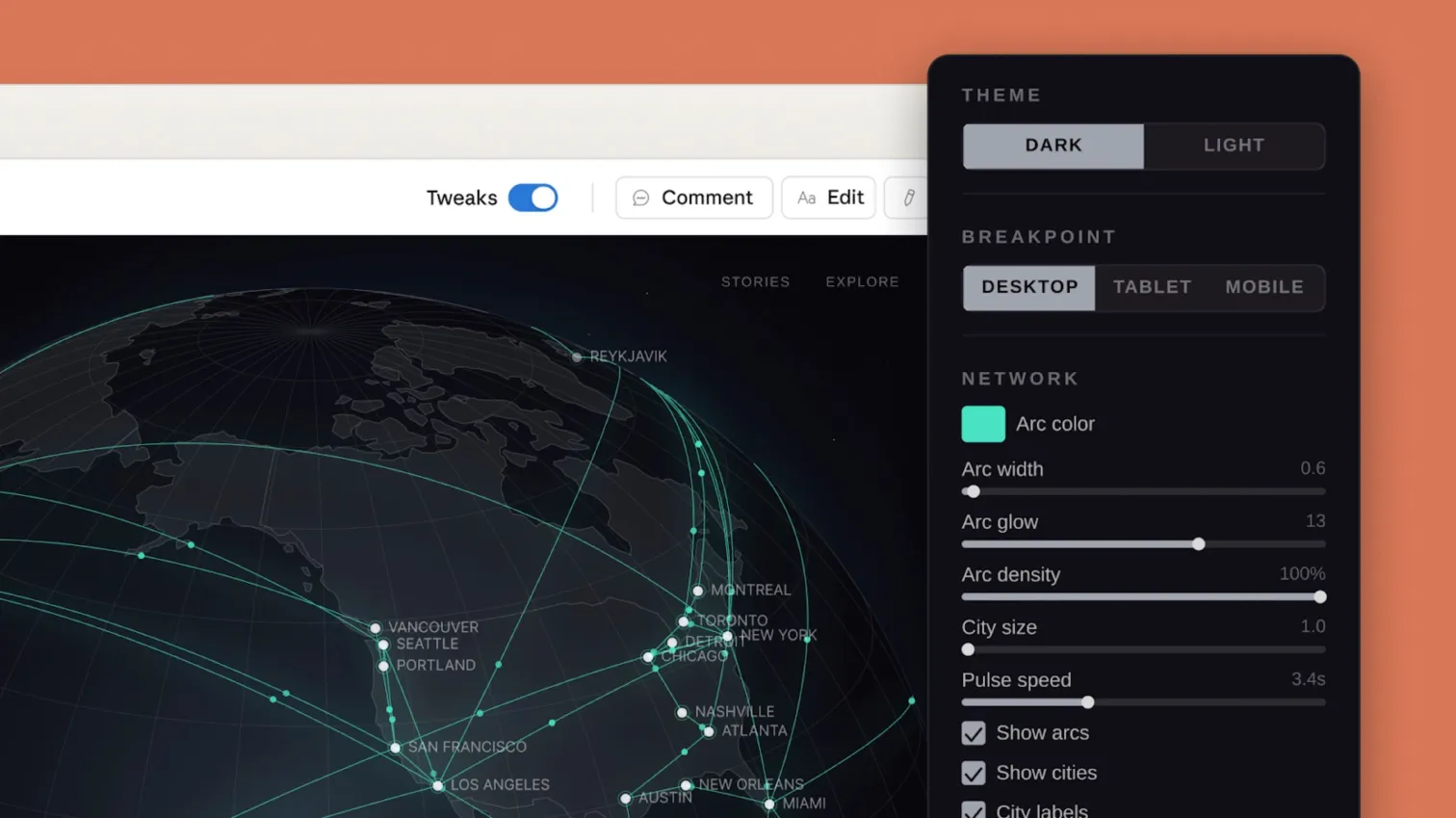
The Claude Design canvas. Left: the rendered output (in this case Anthropic's own launch visual). Right: the tweaks panel with theme, breakpoint, and per-parameter sliders. Image via Anthropic.
Attempt one, and why it failed
My first prompt was bad. I'll show it because I want the post to be useful, not the polished version.
Create a 7-second marketing video for Settle AI.

Tell our story: we deploy Claude AI for mid-market
companies. Include:
- Opening title card with logo
- Three proof points (use cases, stats)
- A product shot
- Client testimonial card
- Closing tagline with CTA

Match the style of the attached Anthropic Claude Design
launch video. Use our design system (attached).
I asked for a full product tour in seven seconds. Opener, three use-case proofs, testimonial, CTA. The output rendered, technically. It was unwatchable. Every beat lasted 900 milliseconds, the type-in animation never finished before the next cut, and the whole thing read as a trailer for something that didn't exist. Claude Design did exactly what I asked for. The ask was wrong.
Copying the format of a reference video is the amateur move. Copying its breathing is the useful one. I had copied the format. An eighty-second story arc does not compress to seven seconds. It just gets loud.
The prompt that worked
I threw out the product-tour framing and rewrote the prompt as a six-beat shot list with deliberate breathing room. One moment per beat, two and a half to three seconds each. A proposal card tilting onto the canvas. A type-in filling out the client name. The branded cover page resolving. A subtle hand-off to the Settle wordmark. The whole thing pinned to our site's voice and stripped of any external references.
Six-beat hero loop. 16 seconds. 2.5-3s per beat.
For settlewithai.com homepage, below the Orient case
card. No story arc. No narrative compression. Loopable.

Voice and look: attached design system. Fraunces display
+ Manrope body. Cream #e8e6dc base, #141413 text,
#D97757 salmon accent. Generous whitespace.

Pacing reference: attached Anthropic Claude Design launch
video. Use its breathing (slow pans, type-in caret,
editorial kickers). Do NOT copy its three-act story arc.

Beats:
1. Blank canvas → proposal card slides in from
   bottom-right, tilted 6deg.
2. Type-in caret fills the client field:
   "Orient Printing Systems, est. 1946."
3. Card straightens to 0deg. Pagination dots below
   read "1 of 12."
4. Hard cut to a full-frame branded cover resolving.
   Filename in the top bar: "Orient_Proposal_v3.pdf"
5. Three-pane shot. Instructions left, output center
   (the PDF), review panel right. Subtle pulse on the
   review panel's active state.
6. Hand-off to Settle wordmark. Under it, one line:
   "AI deployment, production-grade."

Don't include: chat UI, testimonial cards, mic icons,
stock footage. Don't use "transforming," "unlocking,"
"leveraging," or any hype verb.

Export: standalone HTML, 1920x1080, for QuickTime
screen recording at 24fps.
The second render took two minutes in Claude Design. The first frame was correct. The pacing matched the reference video's breathing, not its story structure. The typography followed our design system without me needing to correct it. I stopped there.
Screen record, trim, embed
Claude Design outputs a standalone HTML file. I opened it at 1920×1080 in Chrome, QuickTime screen-recorded at 24fps, and saved the raw capture. Four minutes.
The raw capture had a two-second pre-roll before the animation started and a hanging end frame. I trimmed both in CapCut, added a four-frame crossfade at the loop point so the cycle is seamless, and exported as MP4 at the same resolution. Eight minutes.
Dropped into the homepage section below the Orient case study card with autoplay muted loop playsInline. Adjusted the surrounding section to 100vh on desktop so the video reads full-frame. Published.
Two iterations, twelve minutes in the canvas. Four minutes of screen recording. Eight minutes in CapCut. The homepage was live at the forty-five minute mark.
What I'd do differently
The first prompt tried to do too much. I compressed an eighty-second narrative into seven seconds because the reference video felt “correct” and I didn't stop to ask what job the video actually had on the page. A reference video is a cadence reference, not a format template. Homepage loops and launch videos have different jobs. The sooner you separate those two, the better your first render gets.
The placeholder copy in attempt one was generic. “Your stack. Your constraints.” That kind of text gestures at positioning without committing to it. The second prompt named specific Settle outputs (proposal cover, client name, branded PDF) because the hero needed to show Claude producing something real, not a mood board of what AI might feel like.
I started with a chat-thread visual. A typing indicator, a Claude-style response, a user message. Then I remembered Settle's page already has an interactive chat widget three scrolls down. The hero was restating a thing the page already says better. Chat-thread mockups are a reflex for AI content. They're almost never the right choice when your own page has a real chat.
Quota burn. Claude Design runs against your plan's existing Claude usage limit. I worked through eight drafts before I understood that the first two or three had eaten the rest. If I'd written the six-beat shot list before opening the tool, I'd have spent two renders instead of eight. The canvas is not a place to think. It's a place to execute a thought you already had.
When this workflow fits
Good for hero loops, one-shot product explainers, scenic mockups, anything where the final artifact is HTML that you can screen-record at full resolution. Good for founders who can't justify a Musicbed license, a Figma seat, and an After Effects freelancer for a single hero video. Good for services firms with specific positioning that need to show work, not describe it.
Not good for anything needing real audio beyond ambient music. Not good for videos longer than about sixty seconds. The HTML canvas struggles to hold attention past that. Not good when the brand is a founder on camera. Not good for 3D work, shot photography, or anything resembling production footage. If you need a cinematographer, you need a cinematographer.
The point
Claude Design is a tool. The tool is not the value. The value is in knowing which video to make for which slot on which page. A hero loop has a different job than a LinkedIn post has a different job than a landing page explainer, and the prompt structure is different for each. The value is in knowing which prompt gets good output on the first render, versus which one will eat half your weekly quota on drafts that miss the brief. The value is in knowing when to stop.
A founder who opens Claude Design and prompts “make me a marketing video” gets slop. A founder who prompts with a six-beat shot list, a design system, a reference video, and a clear thesis about what the video has to do — that founder gets a hero in an hour.
That's the discipline we bring to every Claude deployment at Settle, and it's the same reason the Orient engagement shipped eleven production systems in under sixty days. The tool is the easy part. The brief is the work.